Noise problems near variable-frequency drives, motors and switchgear rarely come from the cable name alone; they come from the wrong screen construction, poor bonding or an unsuitable installation method. By the end, you will be able to define the cable you need, distinguish a screen from armour and protective conductors, specify termination requirements, and check whether a dealer’s supply is suitable for the installation.
Key takeaways
- Use a screen for EMC, signal integrity or defined earth-fault performance.
- Specify conductor, insulation, screen, armour, sheath, voltage and core arrangement.
- Keep screen continuity intact through routing, glands, terminations and testing.
- Request datasheets, compliance documents, batch details and test certificates.
When a screened cable is necessary—and when it is not
Choose a screened cable instead of an ordinary unscreened power cable when electromagnetic interference, signal integrity, or earth-fault performance justifies its extra cost and installation effort. A routine power run in a clean electrical environment, separated from sensitive circuits and with no EMC requirement, usually needs no screen.
Choose screened cable for benefits when the route runs near variable-frequency drives, motors, switchgear, contactors, or high-current feeders. The metallic screen reduces electric-field coupling, crosstalk and radiated interference, but it works only when coverage, bonding and termination are correct.
Use a screen when you need:
- Stable readings from instrumentation, control or communication circuits exposed to switching noise.
- Lower interference from a VFD-to-motor connection and more predictable motor-cable EMC performance.
- A metallic path for earth-fault current, when the design specifically assigns the screen that protective function.
- Reduced coupling between adjacent circuits where separation alone cannot control disturbance.
Do not assume every screened cable is interchangeable. Identify whether the requirement is a screened power, control, instrumentation or data cable, then confirm whether the screen is an EMC screen, electrostatic screen, neutral or concentric conductor, or protective conductor.
An ordinary cable remains the better choice when the screen has no defined electrical role; unused metal adds termination points, bonding work and failure opportunities. Routed power and signal cables still need separation, suitable crossing angles and low-impedance bonding. A screen bonded to painted or corroded metal can deliver none of its promised benefits.
Specify the cable construction before comparing quotations
Match the cable to the load, voltage system and route before comparing prices. A description such as “Polycab screened cables” is not a construction specification. A different screen, insulation compound or core arrangement can change ampacity, termination parts and installation limits.
- State conductor material, Class 2 or Class 5 construction, cross-sectional area and number of cores. Check continuous current, voltage drop and short-circuit withstand against the load.
- Specify insulation and sheath compounds, rated voltage, operating temperature, fire performance and applicable standard. Confirm that the rating suits the ambient temperature, moisture, chemicals, sunlight and installation location.
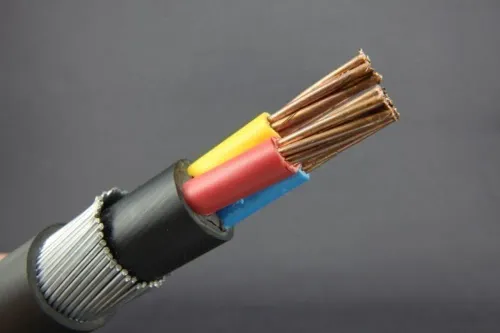
- Name the screen: copper tape, copper wire braid, concentric copper wires or another defined arrangement. Record coverage, cross-section and purpose—protective conductor, neutral, electrostatic screen or EMC screen.
- Include overall diameter, minimum bend radius, maximum pulling tension, sidewall pressure and required drum length. Use the manufacturer’s datasheet rather than a generic contractor rule.
- Require the quotation and drum label to show the exact part number, batch or manufacturing date, nominal size, voltage rating, standard, test certificate and full-drum or cut-length status.
| Application | Construction details to match | Termination and route check |
|---|---|---|
| Power cable | Core size, insulation grade, screen cross-section and short-circuit rating | Glands, lugs, earthing and bend radius |
| Control cable | Core count, conductor class, pair or group screen and drain arrangement | Ferrules, segregation and control-panel entry |
| Instrumentation cable | Pair count, individual or overall screen and low-noise construction | Shield continuity and moisture protection |
| Data or communication cable | Impedance, pair geometry, braid or foil coverage and bandwidth | Connector type, bend limit and separation from power circuits |
Treat the screen, armour and protective conductor as different functions
Do not treat a metallic screen as an automatic earth path. Decide its job first: EMC shielding, protective conductor, neutral or concentric conductor. Armour remains a separate mechanical and fault-protection component unless the design specifically assigns it an electrical role.
| Role | Grounding decision | Termination method |
|---|---|---|
| EMC screen | Bond both ends where high-frequency noise control is required; follow the earthing design to avoid unwanted circulating currents | Use a 360-degree gland or clamp with the shortest practical connection |
| Protective conductor | Connect both ends and verify its cross-section and short-circuit withstand meet the fault-clearing design | Terminate with approved earth lugs, glands or bonding clamps |
| Neutral or concentric conductor | Connect it according to the supply system; do not earth it as a substitute for the neutral arrangement | Use identified neutral or concentric terminals and preserve conductor continuity |
| Electrostatic screen | Connect at the designated reference end when the design requires a single-point reference | Use a dedicated drain or screen terminal; avoid an improvised long pigtail |
Before approving the cable and accessories, confirm:
- The screen construction, cross-section and fault rating match its assigned function.
- The armour is not being counted as a protective conductor without design verification.
- The gland, cleat, lug and bonding hardware suit the actual outside diameter, enclosure entry and required ingress-protection rating.
- End-to-end screen resistance, bonding continuity and insulation resistance will be recorded before energisation.
Protect screen performance during routing, termination and testing
A screen loses value when routing, bending or termination breaks its low-impedance path. Keep the cable away from unnecessary parallel runs beside noisy power circuits, respect its minimum bending radius, and avoid crushing the screen with cleats or clamps.
At each enclosure, match the gland or clamp to the cable’s actual diameter, screen construction, armour and required ingress-protection rating.
Use a continuous, manufacturer-approved screen termination. For high-frequency interference, a 360-degree EMC gland or circumferential clamp is preferable where the equipment and cable design support it; a long drain-wire pigtail adds inductance and weakens performance.
Bond the screen at the points required by the earthing and EMC design, rather than improvising a single-ended or both-ended connection.
Before energisation, record these checks:
- Measure end-to-end screen resistance and compare both ends with the intended bonding arrangement.
- Verify continuity of the bonding conductor, armour bond and every screen connection.
- Check that glands, clamps, drain wires and pigtails have not interrupted or excessively lengthened the screen path.
- Perform insulation-resistance testing between conductors, screen and earth using the specified test voltage.
- Inspect terminations for loose hardware, damaged insulation, exposed braid and incorrect gland compression.
- Confirm that the screen has not been used as a protective conductor unless its cross-section and short-circuit withstand are designed for that role.
Termination choice affects the result:
| Method | Main limitation | Use |
|---|---|---|
| 360-degree EMC gland | Needs compatible cable and enclosure entry | High-frequency noise control |
| Short approved pigtail | Adds inductance | Only where the design permits it |
| Improvised wire wrap | Uncontrolled contact and bonding | Do not use |
What a capable cable dealer should document and supply
An invoice that says only “Polycab screened cable” is not enough to control an installation. Require the quotation to identify the application—power, control, instrumentation, or data—the conductor material and class, core count and size, insulation and sheath compounds, screen type and coverage, voltage grade, fire performance, applicable standard, and drum length.
- Before ordering, obtain the exact part number, datasheet, installation instructions, test certificate, batch or manufacturing date, and the stated minimum bend radius, pulling tension, and sidewall-pressure limits.
- Require a compatibility schedule for glands, cleats, lugs, termination kits, screen-bonding hardware, and earth connections. Match each item to the cable’s actual outside diameter, screen or armour construction, enclosure entry, and required IP rating.
- On delivery, compare the drum label with the order: part number, nominal size, voltage rating, standard, batch, length, and whether it is a full drum or cut length.
- Inspect sealed cable ends, drum orientation, sheath cuts, moisture ingress, and measured length. Record photographs and quarantine any discrepancy before installation.
- At handover, obtain screen-continuity and insulation-resistance results, termination records, and the final drum-length balance.
A polycab screened cable dealer in chennai should coordinate these records with the installer rather than leave compatibility to guesswork. Prabhat Cables Pvt. Ltd can be useful to a buyer who asks for this complete documentation instead of selecting “cable dealers polycab screened cable for benefits” claims alone.
Use the product datasheet, not a generic contractor rule, for handling limits.
Related product
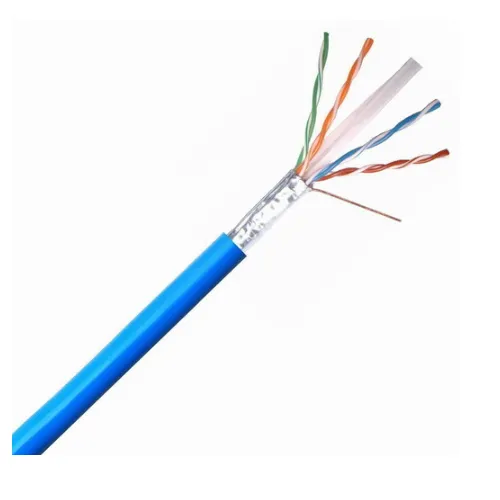 | Polycab Screened Cables Polycab screened cables are power cables designed with a metallic shield (screen) to minimize electromagnetic interference (EMI) and ensure signal... View product → |
Frequently asked questions
When do you need a screened cable?
Choose one when electromagnetic interference, signal integrity or earth-fault performance justifies the added cost and installation effort. A clean, separated routine power run usually does not need a screen.
What should you specify before comparing screened cable quotations?
State the conductor material and size, number of cores, insulation, screen construction, armour, sheath, rated voltage, installation environment and required standards or tests.
Are the screen, armour and protective conductor the same?
No. The screen controls electromagnetic coupling, armour provides mechanical protection and can form part of the fault-current path, while the protective conductor provides the intended equipment-earthing path.
How do you protect screened cable performance during installation?
Maintain screen continuity, use compatible glands and termination hardware, avoid damage and excessive bending, separate the route from noisy circuits, and test continuity and insulation after installation.