Choosing a signal cable depends on the equipment, impedance, frequency, distance and installation environment—not on the word “coaxial” or an RG label alone. By the end, you will be able to compare coaxial cable with fibre, Ethernet, telephone cable and wireless links, then specify and inspect the right cable for your installation.
Key takeaways
- Use 75-ohm coaxial cable only with analogue CCTV equipment designed for it.
- Choose RG-59 for short runs, RG-6 for longer runs, and RG-11 for extended distances.
- Match BNC connectors, impedance and power delivery to the camera and recorder.
- Keep coax away from mains cables and avoid tight bends, crushing or sharp staples.
Choose the transmission method before choosing the cable
Start with the signal system and site conditions, not the cable catalogue. For analogue CCTV, a 75-ohm coaxial path suits cameras and recorders designed for it. Network cameras normally need balanced twisted-pair Ethernet, switches and network recording infrastructure; substituting coax changes the system, not merely the purchase.
| Transmission method | Best fit | Main limitation |
|---|---|---|
| Coaxial cable | Analogue CCTV, CATV and broadband over established 75-ohm equipment | Loss increases with distance, splitters and connectors |
| Optical fibre | Long links, high bandwidth, electrical isolation and routes near high-voltage equipment | Needs optical transceivers and specialised termination |
| Twisted-pair Ethernet | IP cameras, data networks and PoE devices | Requires switches, compatible endpoints and a practical cable length |
| Telephone cable | Voice circuits and legacy low-bandwidth services | Unsuitable for modern video and high-speed network traffic |
| Wireless | Short or difficult routes where cabling is impractical | Walls, interference, power availability and link security affect reliability |
Choose coax when the camera, recorder, distribution equipment and connectors already use a 75-ohm video path. Choose fibre where distance, lightning exposure or electromagnetic interference outweighs termination effort; choose Ethernet for IP devices; choose wireless only after checking radio coverage and a dependable power source.
A search for “polycab coaxial cable dealer in vadodara” identifies a supplier, not a transmission category. Ask for the signal’s frequency, endpoint type, distance and splitter count before comparing coaxial options.
Match RG-59, RG-6 or RG-11 to distance and frequency
A short analogue CCTV run may suit RG-59, but satellite IF or high-bandwidth television demands the datasheet’s attenuation at the actual frequency. RG labels are not performance grades: conductor diameter and material, dielectric size, braid coverage, foil layers and jacket rating vary between products.
| Specification | Construction and trade-off | Best fit |
|---|---|---|
| RG-59 | Smaller conductor and diameter; higher attenuation over distance | Short indoor CCTV or video runs at modest frequencies |
| RG-6 | Larger conductor and stronger shielding; lower attenuation than typical RG-59 | CATV, broadband, satellite and medium-length video runs |
| RG-11 | Larger, stiffer cable with the lowest attenuation of these three when similarly built | Long runs where pulling space and bend radius permit |
Choose by the attenuation figure in dB per 100 m at your operating frequency, not by a promised distance. A cable that works for analogue video can lose too much satellite signal at higher frequencies.
Add splitter, connector and wall-outlet losses: an ideal two-way splitter costs about 3.5 dB, while an ideal four-way splitter costs about 7 dB before insertion loss.
Check return loss as well as attenuation. Higher return loss means fewer reflections from impedance errors, damaged connectors or poor shielding transitions. Keep the nominal impedance at 75 ohms; a 50-ohm cable is not an equivalent substitute.
A comparison of polycab co axial cable options is useful only after checking frequency range, conductor design, shielding, jacket, diameter and connector compatibility on the datasheet.
Pair the coaxial cable with the right connectors and power arrangement
Start with the equipment, not the connector. Use a 75-ohm F-connector for compatible CATV, broadband, satellite and antenna equipment; its thread and compression sleeve must match the cable’s outside diameter, dielectric size and shield.
Use a 75-ohm BNC for analogue CCTV and video equipment, selecting the correct BNC size for RG-59, RG-6 or the specified cable. A 50-ohm connector or cable may fit physically but creates impedance mismatch, reflections and poorer return loss.
Before ordering, confirm:
- The equipment socket: threaded F or bayonet BNC, plus its required 75-ohm impedance.
- The connector termination: compression usually gives steadier shield contact than an improvised crimp.
- The centre conductor: solid copper is the safer choice when the coax carries meaningful DC power; copper-clad steel suits RF-only runs better.
- The power path: whether the camera or device receives DC through the coax, a separate pair, or Power over Ethernet.
Analogue CCTV commonly uses a coaxial video pair with separate 12 V DC conductors, often sold as siamese cable, when the camera has no power at its mounting point. Add separate conductors when voltage drop, camera heaters, infrared illuminators or PTZ motors exceed the available coax power arrangement.
CATV receivers normally need only the coax, while satellite systems can send LNB power through the coax. Ask a coaxial cable distributor in Vadodara to verify the connector and power specification against the equipment manual.
Install signal cable without damaging its performance
A coaxial run can fail without a visible cut: a kink, flattened section or over-tight cable tie changes its geometry, impedance and return loss. Route it in broad curves and obey the selected cable’s datasheet minimum bend radius; never force RG-6 or RG-11 around a corner designed for a smaller cable.
Use the installation limits as a pulling checklist:
- Pull only to the stated maximum tension, using a pulling grip or approved eye rather than the connector.
- Apply compatible pulling lubricant when the conduit run demands it; do not drag the cable over sharp edges.
- Keep conduit smooth, dry and large enough to avoid crushing, and leave access at bends and junctions.
- Run coax in its own conduit away from mains and motor cables. If paths must cross, cross at 90 degrees and avoid long parallel sections.
- Bond the shield and metallic entry hardware to the equipment or building grounding system specified for the installation. Do not leave the shield floating or add random bonds that create ground loops.
For Vadodara’s exposed rooftop or external runs, select a jacket and shield construction rated for sunlight, heat and moisture. Indoor PVC coax remains indoor cable even inside conduit; sunlight can embrittle the jacket, while trapped water corrodes connectors. Seal outdoor entries with weatherproof compression fittings, form a drip loop, and cap unused conduit openings.
Use a field checklist before buying and after installation
Accept a coaxial run only after the cable, termination and measured signal pass the same checklist. “Polycab distributor coaxial cable for comparison in Vadodara” is a supplier search phrase, not a technical specification.
1. Read the jacket and datasheet. Confirm 75-ohm impedance, the operating-frequency range, attenuation at your actual frequency, return loss, shield construction, centre-conductor material, outside diameter, jacket rating, minimum bend radius and maximum pulling tension. Reject indoor PVC cable for exposed outdoor routing unless its rating covers sunlight and moisture.
2. Inspect every connector. The F or BNC type must match the equipment and cable diameter; the braid must not be trapped under the centre conductor, the dielectric must be cleanly trimmed, and the crimp or compression sleeve must be tight.
A kinked cable, flattened jacket or loose connector can create an impedance fault without visible conductor damage.
3. Verify the order with the supplier. Ask for the exact model, datasheet, batch or drum identification, conductor construction and shield percentage or layers. Confirm whether solid copper is needed for DC power, then calculate cable attenuation plus every splitter and connector loss against the system’s permitted loss budget. Prabhat Cables Pvt.
Ltd can provide this comparison when you ask for model-level documentation rather than a generic Polycab coaxial cable description.
4. Test after installation. Check continuity and shield-to-centre shorts, then measure insertion loss or signal level at the operating frequency; use a return-loss or time-domain test where available. For CCTV or data links, verify the picture, error rate and power voltage at the far end before acceptance.
Related products
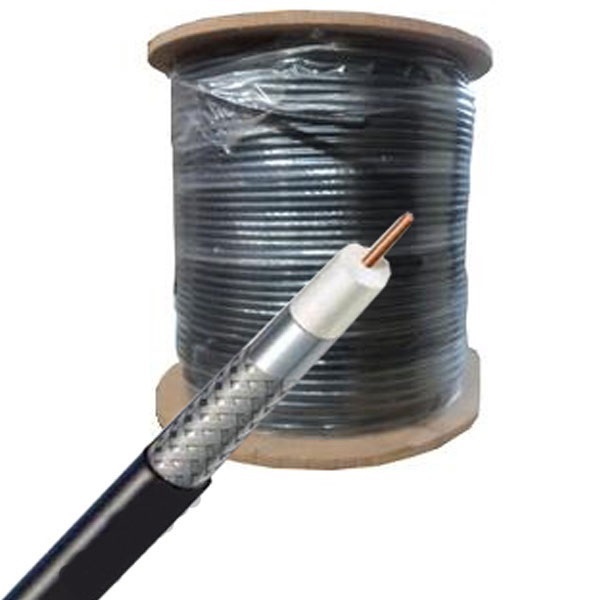 | Polycab Co-Axial Cables Polycab coaxial cable is a type of cable designed for transmitting high-frequency electrical signals, commonly used in cable television (CATV) and... View product → |
 | Polycab Optical Fibre Polycab Optical Fiber refers to the Optical Fiber Cables (OFCs) manufactured and distributed by Polycab Telecom, a division of Polycab India Ltd. View product → |
Frequently asked questions
Should you choose coaxial cable or Ethernet for CCTV?
Use 75-ohm coaxial cable for analogue cameras and compatible DVRs. Network cameras require balanced twisted-pair Ethernet, switches and network recording equipment; replacing Ethernet with coax changes the system design.
What is the difference between RG-59, RG-6 and RG-11?
RG-59 suits shorter CCTV runs, RG-6 reduces loss over longer runs and higher-frequency signals, and RG-11 is intended for extended distances where its larger size and harder installation are acceptable.
Which connectors and power arrangement should you use with coaxial CCTV?
Use connectors that match the cable construction and equipment, such as suitable 75-ohm BNC connectors for the video path. Plan camera power separately and check voltage drop, polarity, shared supplies and the distance to each camera.
How do you install coaxial cable without reducing signal quality?
Keep the cable away from mains wiring and strong electromagnetic sources, respect the specified bend radius, avoid crushing or kinking, terminate cleanly and test the completed run before closing walls or conduits.
Related product
 | Polycab Solar Cables Polycab solar cables are specifically designed for solar power systems, offering high-quality, reliable, and durable wiring solutions for efficient... View product → |